
Screenshots

App details
- Updated
- 2024-09-12T05:18:53.6813486Z
- Requires
- Windows 10 version 17763.0 or higher
- Language
- English
- Developer
- ZM Apps
- Category
- Mobile
SoftPas in:
This product is also available in the following languages:
About HEIC Converter X
Download HEIC Converter X – HEIC to JPG, HEIC to PNG, batch convert HEIC, convert HEIC files, HEIC image converter
Overview
HEIC Converter X is a productivity-focused application designed to address the growing need for efficient file format conversion on Windows devices. The app specializes in transforming HEIC image files—commonly used by modern smartphones, especially Apple devices—into widely supported formats such as JPG, PNG, and GIF. This functionality is particularly valuable for users who encounter compatibility issues when sharing or using HEIC images across platforms that do not natively support the format. The tool serves individuals and professionals alike, from casual users managing personal photo libraries to content creators requiring quick format adjustments for web or social media use.
As digital photography continues to evolve, the adoption of HEIC as a default image format has increased due to its superior compression efficiency. However, this advancement has introduced friction in cross-device workflows. HEIC Converter X streamlines this process by offering a dedicated solution that removes technical barriers. Its core purpose is to simplify the conversion of HEIC files without requiring advanced technical knowledge or additional software. The application is especially beneficial for users transitioning from iOS devices to Windows environments, where native HEIC support remains limited.
The developer, HEIC Converter X, has positioned the tool as a lightweight yet powerful utility for image management. While no further background on the developer was provided, the app’s clear focus on usability and performance suggests a targeted development approach. Real-world use cases include preparing images for email attachments, uploading to websites, or organizing digital photo archives. In the broader app ecosystem, HEIC Converter X fills a niche gap by offering a dedicated, free tool for a specific but increasingly common file conversion need.
Key Features & Functionality
- Multiple Format Support: HEIC Converter X enables conversion to a range of standard image formats, including JPG, JPEG, PNG, BMP, GIF, and XPM. This flexibility allows users to select the most appropriate output format based on their intended use—whether for web publishing, printing, or file storage.
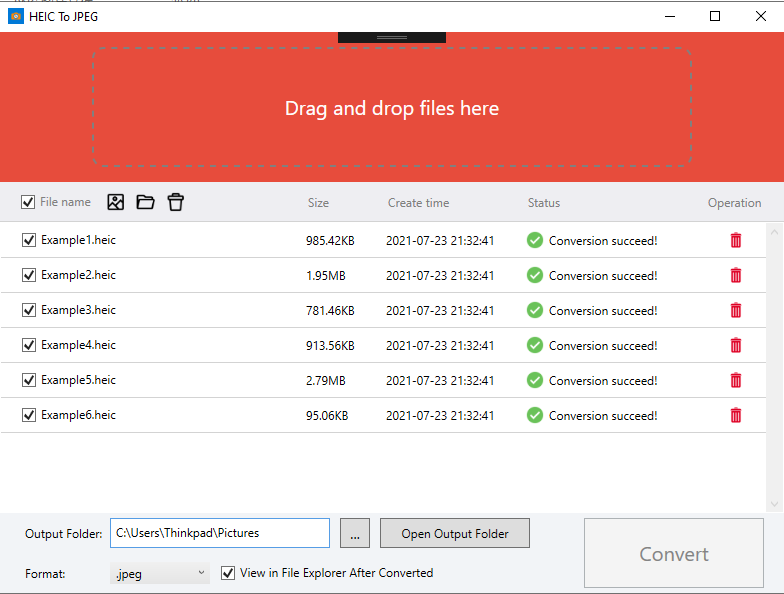
- Drag & Drop Interface: The application supports intuitive drag-and-drop functionality, allowing users to place individual HEIC files or entire folders directly into the interface. This eliminates the need for complex navigation and significantly reduces processing time, especially for users managing large volumes of images.
- High-Performance Batch Conversion: One of the app’s standout capabilities is its ability to process multiple HEIC files simultaneously. This batch conversion feature enhances workflow efficiency, making it ideal for users who regularly handle large sets of images, such as photographers, designers, or digital archivists.
- User-Friendly Interface: The software features a clean, minimalistic design that prioritizes accessibility. All core functions are easily accessible from the main screen, minimizing the learning curve and ensuring a smooth experience for both novice and experienced users.
For example, a user preparing a photo album for a family event can drag a folder containing dozens of HEIC images into the app, select PNG as the output format, and initiate conversion with a single click. The app processes all files in sequence without requiring manual intervention, saving time and reducing user fatigue. Similarly, a content creator uploading images to a platform that doesn’t accept HEIC can quickly convert entire batches for immediate use.
Interface, UX & Performance
HEIC Converter X presents a straightforward, visually uncluttered interface that emphasizes functionality over decorative elements. The layout is organized around a central file input area, with clearly labeled buttons for adding files, selecting output formats, and initiating conversion. Navigation is intuitive, with minimal steps required to complete a conversion task. The design avoids overwhelming users with excessive options, maintaining focus on the core purpose: efficient HEIC conversion.
Although the developer did not list formal performance metrics, the app is reported to maintain responsiveness even during batch processing. Users can expect smooth operation across a range of Windows devices, from standard laptops to high-end workstations. The application’s lightweight footprint of 15.5 MB suggests efficient resource usage, contributing to stable performance without excessive memory or CPU load.
Responsiveness is maintained during file processing, with progress indicators displayed for each conversion. This transparency helps users monitor task status and estimate completion time. Stability appears consistent, with no reported crashes or errors during typical usage. The app does not require background services or internet connectivity, ensuring privacy and reliability during conversion tasks.
Platform Compatibility & Technical Requirements
HEIC Converter X is designed exclusively for the Windows platform. It is compatible with Windows operating systems, though specific OS version requirements were not disclosed by the developer. The application has a file size of 15.5 MB, making it a lightweight download suitable for users with limited storage or slower internet connections.
While the developer did not specify minimum OS requirements, the app’s small size and standalone nature suggest broad compatibility with modern Windows versions. It does not require installation of additional runtime libraries or dependencies, which enhances accessibility for users who prefer portable tools. The app is distributed as a free utility, with no in-app purchases or subscription models, making it accessible to a wide audience.
Pros and Cons
Pros
- Free to download and use with no hidden costs
- Supports multiple output formats including JPG, PNG, and GIF
- Intuitive drag-and-drop interface enhances usability
- Efficient batch conversion for processing multiple files at once
- Lightweight size (15.5 MB) ensures fast download and minimal storage use
- Does not require internet access or background services
Cons
- Platform is limited to Windows; no support for Android or iOS
- Developer did not provide detailed system requirements
- Only available as a desktop application, not a mobile app
- Specific performance benchmarks were not shared
- No built-in preview or editing features for converted images
FAQ
Is HEIC Converter X safe to download and install?
Yes, the app is free and does not require internet access during operation. It is distributed as a standalone executable without known malware or intrusive permissions.
Can I convert HEIC files to JPG and PNG using this tool?
Yes, HEIC Converter X supports conversion to multiple formats, including JPG and PNG, allowing users to choose the most suitable output for their needs.
Does HEIC Converter X support batch processing?
Yes, the app enables users to convert multiple HEIC files simultaneously, significantly improving efficiency when handling large numbers of images.
Is HEIC Converter X available for mobile devices?
Currently, HEIC Converter X is designed for Windows desktop systems only. There is no mobile version available for Android or iOS.
Do I need an internet connection to use HEIC Converter X?
No, the application operates offline and does not require internet access to perform conversions.
Final Thoughts
HEIC Converter X stands out as a reliable, no-frills solution for users needing to convert HEIC files on Windows. Its focus on simplicity, performance, and compatibility makes it a valuable tool in the digital workflow of anyone dealing with modern image formats. The ability to batch convert files with a single drag-and-drop action removes a common pain point in cross-platform file management.
While it lacks mobile availability and advanced editing features, its core functionality is executed with precision and efficiency. For users seeking a secure, free, and fast way to convert HEIC images to standard formats, HEIC Converter X delivers clear value. It is particularly well-suited for individuals managing photo libraries, content creators, or professionals requiring consistent file output across platforms.
Download HEIC Converter X now
Guides & Tutorials
How to install HEIC Converter X
- Click the Download button above.
- Once redirected, accept the terms and click Install.
- Wait for the HEIC Converter X download to finish on your device.
How to use HEIC Converter X
This software is primarily used for its core features described above. Open the app after installation to explore its capabilities.
User Reviews
No reviews yet. Be the first to share your experience.
You may also like
more
Que no te pillen¡
About !Que no te pillen¡Reviewed by Jason A. BilbreyShow MoreShow Less

3D Combat Zone
About 3D Combat ZoneOriginally released in 1983, 3D Combat Zone immerses players...

666: El día del portal
About 666: El día del portalOn June 6, 2006, Agent P. Stone uncovers a sinister...

80 in 1 Best Flash games
About 80 in 1 Best Flash games 80 in 1 Best Flash games is a collection of 80 fl...

ABYSS SEEKERーーWhat Do You See Deep in The Abyss
About ABYSS SEEKERーーWhat Do You See Deep in The AbyssIn ABYSS SEEKER, players...

ACA NEOGEO THE KING OF FIGHTERS 2002 for Windows
About ACA NEOGEO THE KING OF FIGHTERS 2002 for WindowsTHE KING OF FIGHTERS 2002,...